
Mobile Mechanic Invoice Template: Free PDF and Excel for Diesel Road Calls
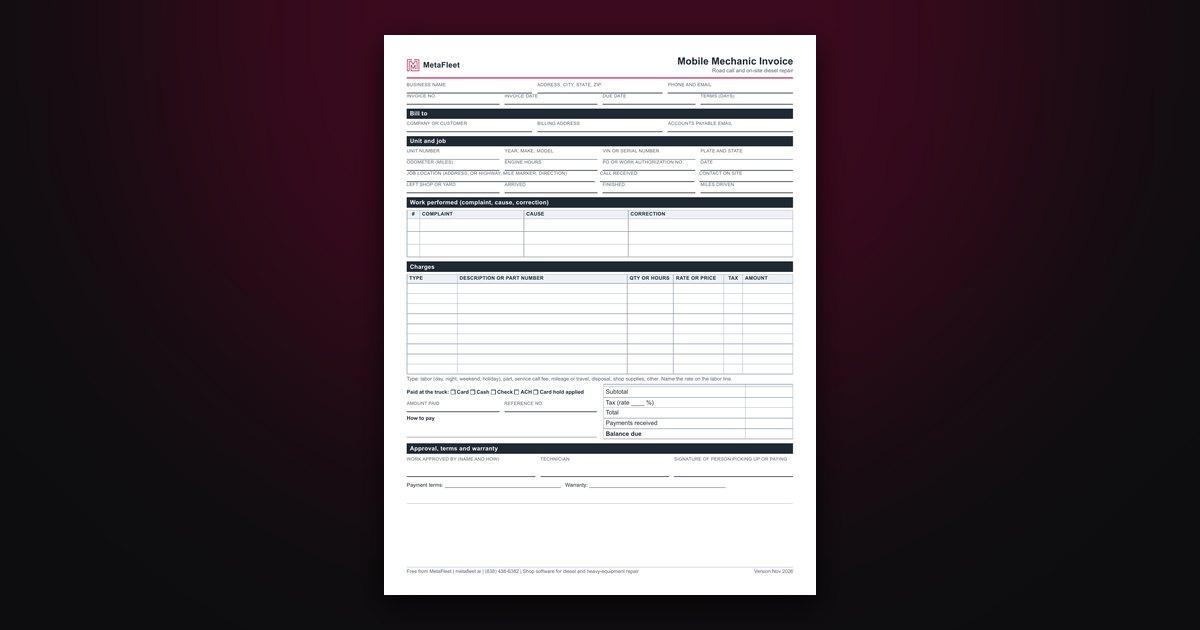
A free mobile mechanic invoice template for diesel road calls, with job location, arrival and finish times, service call fee, mileage, after-hours labor and payment at the truck.
A mobile mechanic invoice carries everything a shop invoice does, plus the job location, the times you arrived and finished, a service call fee, mileage or travel time, any after-hours rate and payment taken at the truck. The free PDF and Excel files below have a place for each one and work out the totals.
A mobile mechanic invoice is a repair invoice with the extra lines a road call needs. The customer was not at your shop, so the invoice has to show where you were, when you got there, how long the work took and what it cost to bring the shop to them. The free PDF and Excel files below do that. The Excel file works out the time on site, the totals, the tax and the balance due.
This is for mobile diesel and heavy-equipment mechanics and the shops that dispatch them. For every field on a regular repair invoice, from the PO number to the warranty terms, read what to put on a truck repair invoice. This page covers what a road call adds. How to price those extras is in mobile diesel mechanic rates.
Mobile Mechanic Invoice Template
A road call invoice with the job location, arrival and finish times, service call fee, mileage, after-hours labor and payment at the truck. Comes as a PDF to print and an Excel file that works out the totals.
No spam. Just the occasional guide for repair shops and fleets.
What a road call adds
| Line | What goes in it |
|---|---|
| Job location | The address, or the highway, mile marker and direction, or the job site name |
| Call received, left, arrived, finished | The times, so the labor and any after-hours rate can be backed up |
| Time on site | Arrival to finish, worked out for you in the Excel file |
| Service call fee | Its own line, named the way your rate sheet names it. See service call fee |
| Mileage or travel time | The miles or hours next to the amount. See mileage charge |
| After-hours or emergency labor | Named on the labor line, such as Labor (night). See after-hours rate |
| Payment at the truck | Amount, how it was paid and a reference, or a card hold applied. See card hold |
How to fill it out at the truck
Fill in the unit, the VIN or serial number and the mileage or engine hours before you start. Write the location from the call, not from memory. Note the times as they happen: when the call came in, when you left, when you got there and when you finished. Write each problem as complaint, cause and correction. Then add each charge on its own line with the type, hours or quantity and rate. Name the rate on labor lines. Mark each charge taxable or not, because what is taxable depends on your state.
Get paid at the truck or send it the same day
Some customers pay at the truck. If they do, enter the amount and how they paid, and the balance due updates. If they are on terms, send the invoice the day the job closes, to the accounts payable email and not to the driver. Print the due date as a date. Choosing terms is covered in net 30 terms for fleet customers.
Check your own state's rules
Tax, written authorization and consumer rules for repair invoices differ by state. Have your warranty wording read by a lawyer once. This is not legal or tax advice. Check your own state's rules before you rely on this form.
Road call invoice mistakes
- No job location or times, so the call fee and any after-hours labor get questioned.
- Mileage rolled into the labor rate with no line of its own.
- A payment taken at the truck and left off the balance.
- Sent to the driver, not to accounts payable.
- Written days after the job.
Where MetaFleet fits
In MetaFleet the tech works the whole job from any phone browser, and the invoice goes out as a PDF with a card or ACH pay link through Stripe. A card hold can be taken before the truck rolls for cash-on-delivery customers. Labor bills at the day, night, weekend or holiday rate by the job site's local time, and invoices flow to QuickBooks Online. See invoicing and payments for diesel repair shops, or MetaFleet for mobile diesel repair.
FAQs
Ready to invoice from the road the day the job closes?
See MetaFleet in Action
Book a demo and we'll walk through how your mobile techs close and bill road calls today, show you where MetaFleet fits, and build a simple rollout plan your team can follow.
Not ready to talk? Try a free shop tool
Related Articles

Truck Repair Invoice: What to Include, Plus a Free Template
Every field a diesel truck or heavy-equipment repair invoice should carry, from the unit number and engine hours to complaint, cause and correction lines, plus road-call extras, the mistakes that hold up payment and a free template.

Mobile Diesel Mechanic Rates: Pricing Road Calls, Mileage and After-Hours
How to build a mobile diesel mechanic's price from a service call fee, hourly labor, mileage or travel time, after-hours and emergency rates and minimums, with three sample calls, a phone quote script and fleet vs one-off pricing.