
Invoicing and billing software for diesel repair shops Bill the 2 a.m. call like a 2 a.m. call.
Your after-hours rates applied, the customer's OK in writing, and a pay link before your tech leaves.


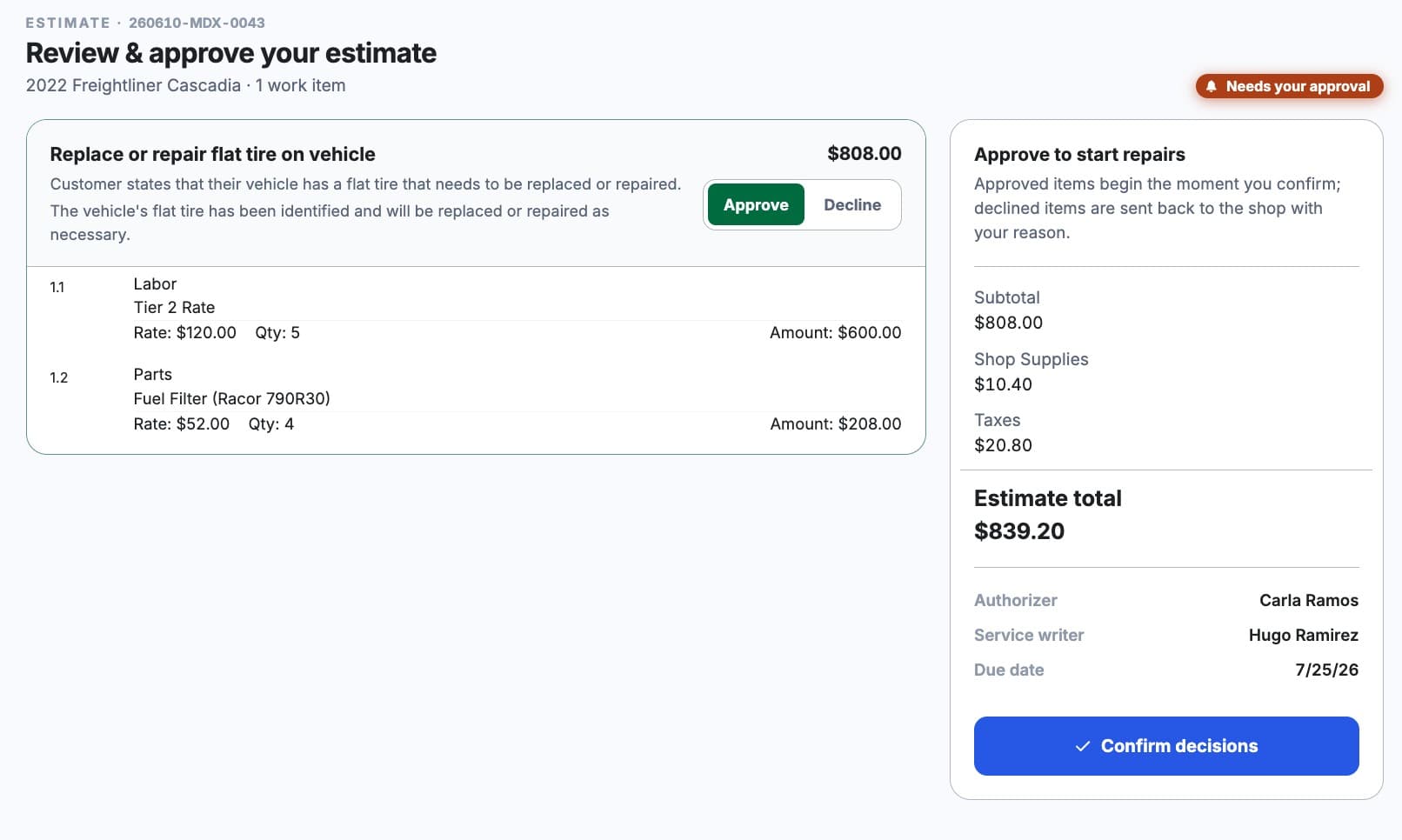
Estimate approvals in writing, not over the phone
Customers approve estimates from a link or the portal, and the approval is saved on the job.
- Optional manager review before anything goes out
- Trusted customers can skip approval
- Extra work mid-repair gets its own approval
After-hours labor rates, applied automatically
Set day, night, weekend and holiday rates once. MetaFleet picks the right one by the job site's local time, so nobody has to choose.
- Parts markup that follows your pricing matrix
- Special rates for individual customers
- Taxes by state, county and city, with a sales tax export
Card and ACH payments, any way they pay
Cards, ACH and pay links through Stripe, with the money going straight to your own account.
- Cash and checks recorded alongside card payments
- Holds before the work, captured after
- Refunds, saved cards and payouts in one place
QuickBooks Online sync without the Friday retyping
Your accountant keeps working in QuickBooks the way they do today.
- Invoices, bills and purchase orders flow to QuickBooks
- Payments sync both ways
- Mismatches get flagged and retried
Collections, without the awkward calls
Late fees and interest
Set for the whole shop or one customer, reviewed before they go out.
Statements and batch payments
Send statements, and apply one payment across many invoices.
AR aging at a glance
See who owes what, and for how long.
How switching shop software works
- 1
A few short walkthroughs
Your real jobs, run through MetaFleet, until you know whether it fits.
- 2
We load and set up your shop
Customers, trucks, parts and rates, imported and checked with you.
- 3
Your crew logs in
On the phone they already carry. Nothing to install.
Your data stays in your own MetaFleet account, and each person sees only what their role allows.
Billing and payment questions shops ask
Can I invoice warranty or comeback work at no charge?+
Yes. MetaFleet creates no-charge invoices for warranty and comeback work, so the labor and parts stay on the job and on the truck's history even when the customer pays nothing. Sales tax is still calculated where it applies, which keeps your records and your tax reporting complete.
Can I add shop supply fees, parts markup and card surcharges?+
Yes. Add shop supply charges and fees from a catalog, use line-item templates for repairs you quote often, and set a parts markup matrix so parts are priced the same way every time. You can also add a card surcharge of up to 3%. Check your state's rules on card surcharges before turning it on.
Can I charge higher labor rates for nights, weekends and holidays?+
Yes. MetaFleet supports separate labor rates for day, night, weekend and holiday work, plus special rates for individual customers. It prices each job using the job site's time zone, so a 2 a.m. roadside call bills at your night rate automatically. Set the rates once and every estimate and invoice follows them.
Does MetaFleet sync with QuickBooks Online?+
Yes. Customers and vendors are matched to your existing QuickBooks Online records, and you confirm each match. Invoices, bills and purchase orders flow from MetaFleet to QuickBooks, payments sync both ways, and your parts catalog can come in from QuickBooks. Mismatched totals get flagged and retried so your books match.
How do customers pay a diesel repair invoice?+
Every invoice goes out as a branded PDF with a pay link, and fleet customers can also pay in the customer portal. Payments run through Stripe by card or ACH bank transfer and pay out to your own account. You can place a hold on a card before the work, capture it after, and record cash or check payments too.
Can MetaFleet add late fees to overdue invoices?+
Yes. Set late fees and interest for the whole shop, one brand or a single customer. Before any fee goes out, MetaFleet shows an overdue review page so you approve it. You can also build and send customer statements, apply one payment across many invoices, and track who owes what on the AR aging report.
How are sales taxes handled?+
Build tax groups by state, county and city and tie them to your service areas. MetaFleet applies the tax group for each job's service area and gives you a sales tax export.
I run more than one business. Does that work?+
Yes. Each business gets its own logo on the paperwork, its own Stripe account for payouts, its own QuickBooks connection and its own late-fee policy, all from one MetaFleet account.
Find the money your invoices are leaving on the table.
Bring last month's after-hours jobs. We'll show you how MetaFleet would have billed them.
Not ready to talk? Find your profit leaks (opens in a new tab) · See what we shipped lately