
Parts inventory software for diesel repair shops Stop sending techs out without the part.
Know what's on every shelf and every truck, and pull each part from the closest one that has it.
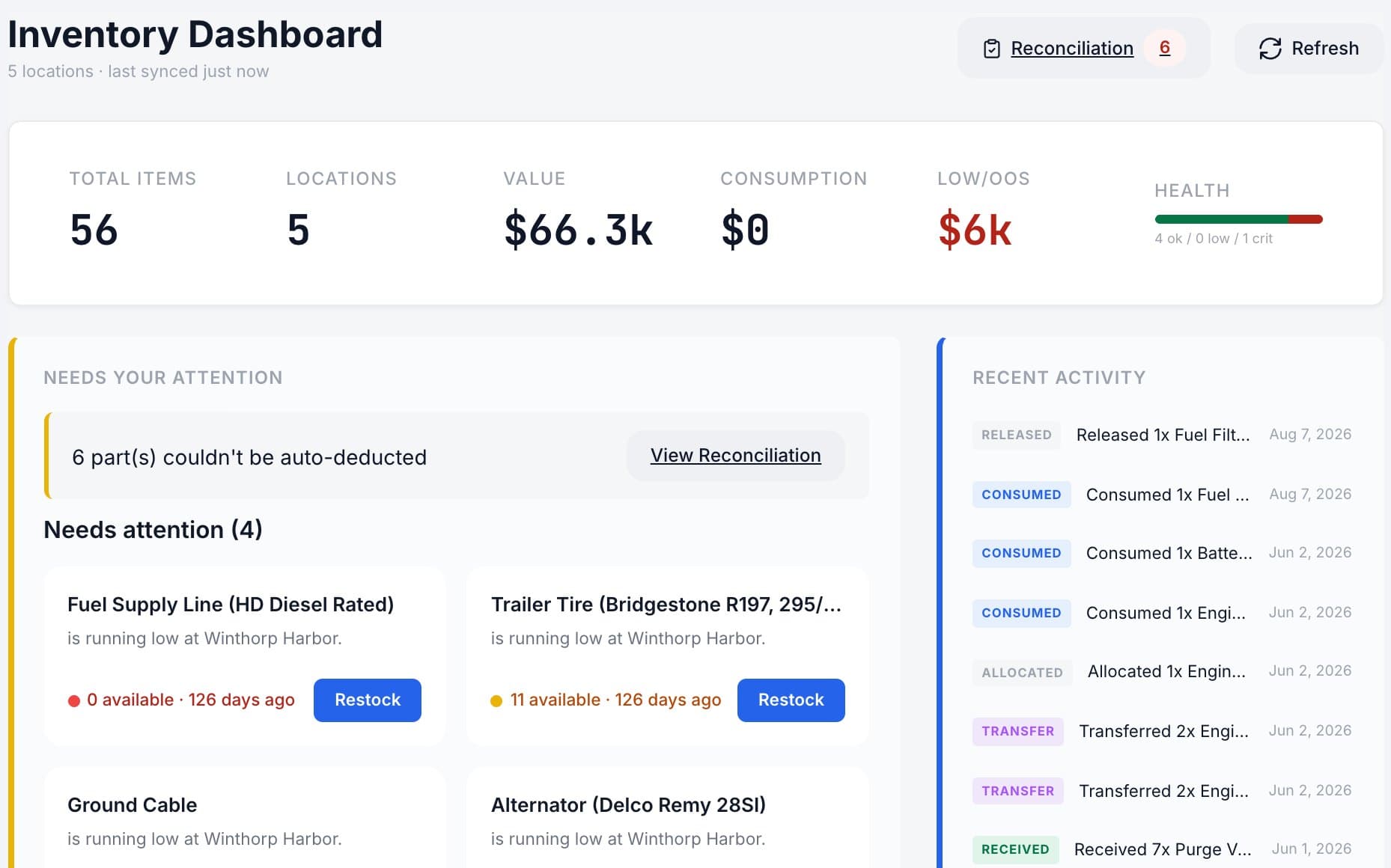
Track inventory in every warehouse and bin
Know what you have and where it is, without walking the shelves.
- Stock by warehouse and bin, with low-stock alerts
- Transfers between locations and cycle counts
- A report of what went out, where, and on which job
Track inventory on every service truck
Each service truck carries its own stock and a person responsible for it.
- The parts desk hands off the kit, the tech accepts it on their phone
- Pick tickets for every kit going out
- Know what's on each truck right now
Cross-reference parts under a different number
Cross-references and substitutes, so a truck doesn't wait on a part that's already in stock.
- Cross-referenced part numbers
- OEM and aftermarket labels
- Pick a substitute when the first choice is out
Snap the receipt. We do the typing.
Photograph a vendor invoice or receipt and MetaFleet types up the purchase order for you. You just check it and submit.
- Every line read for you, vendor invoice number included
- POs allocated to the jobs that need the parts
- POs and vendor bills sync to QuickBooks Online
How switching shop software works
- 1
A few short walkthroughs
Your real jobs, run through MetaFleet, until you know whether it fits.
- 2
We load and set up your shop
Customers, trucks, parts and rates, imported and checked with you.
- 3
Your crew logs in
On the phone they already carry. Nothing to install.
Your data stays in your own MetaFleet account, and each person sees only what their role allows.
Parts and inventory questions shops ask
How are parts priced on estimates and invoices?+
Set a parts markup matrix once and MetaFleet prices parts from it on every estimate and invoice, so nobody has to guess. Parts pulled from a warehouse or a service truck are tied to the job, and your purchase orders and vendor bills sync to QuickBooks Online with the rest of your books.
What parts reports does MetaFleet include?+
The parts consumption report shows what went out, from which location and on which job, and you can download it as a CSV. Stock is visible by warehouse, bin and service truck, low-stock alerts fire at the minimum you set, and cycle counts keep the numbers right between full counts.
Can MetaFleet track parts on each service truck?+
Yes. Every service vehicle can carry its own stock with a named person responsible for it, alongside your warehouses and bins. The parts desk hands parts to a tech, the tech accepts them in MetaFleet, and pick tickets list the kit going out on each job, so you always know what is on the truck.
How does MetaFleet choose where to pull a part from?+
For each part on a job, MetaFleet finds the nearest location that has it in stock, measured by real drive time, so the parts desk can hand the kit to the assigned tech. When a job is stuck waiting on a part, the Parts Watch board shows it, so a dispatcher can chase the part instead of discovering the delay later.
Does MetaFleet handle part cross-references and substitutes?+
Yes. Part numbers can be cross-referenced, parts labeled OEM or aftermarket, and interchangeable parts grouped. When the first-choice part is out of stock, pick a substitute from the group. That matters in diesel work, where the same filter or sensor often sits on the shelf under several different numbers.
Can I create a purchase order from a vendor receipt?+
Yes. Photograph a vendor invoice or receipt and MetaFleet reads it and drafts the purchase order, including the vendor's invoice number, for you to check and submit. Purchase orders move from draft to received and are allocated to the jobs that need the parts, then sync to QuickBooks Online with your vendor bills.
How do I get my current parts list in?+
We import it for you during onboarding from your spreadsheet, along with customers, vehicles and rates. If you use QuickBooks, MetaFleet can also pull your parts catalog from it.
What happens when stock runs low?+
Set a minimum and maximum for each part and location. MetaFleet alerts you when a part drops below its minimum.
Snap a receipt. Watch it become a PO.
Bring a recent vendor receipt. We'll snap it into a purchase order live and show you where every part would sit.
Not ready to talk? Find your profit leaks (opens in a new tab) · See what we shipped lately