
Month-End Close Checklist for a Repair Shop: Free PDF and Excel
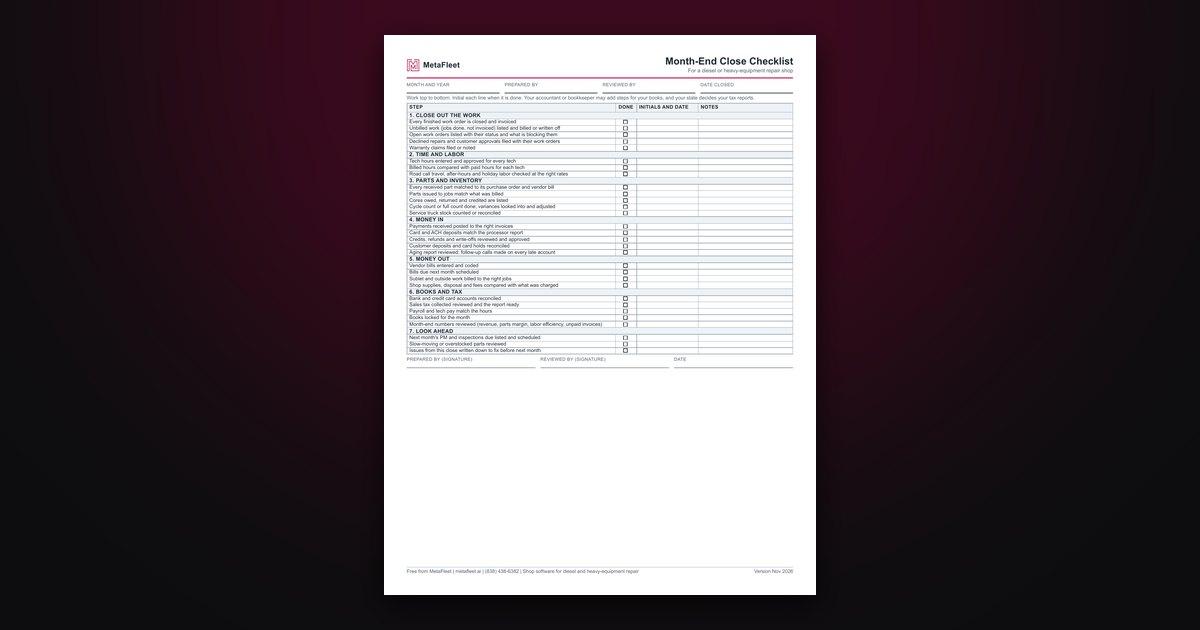
A free month-end close checklist for diesel and heavy-equipment repair shops: close out jobs, check tech hours, count parts, post payments, chase aging and lock the books.
A month-end close checklist for a repair shop closes out finished jobs, checks tech hours against billed hours, matches parts to purchase orders and bills, posts payments, reviews aging, reconciles the accounts and locks the books. The free PDF and Excel files below put each step in order with a status and an owner.
A month-end close checklist is the list of steps a shop works through to finish one month of work and start the next with clean numbers. Most of the trouble is jobs that were done and not billed, parts nobody matched to a bill and hours that do not match the invoices. The free PDF and Excel files below put the steps in order.
This is for owners, office managers and bookkeepers at diesel and heavy-equipment shops, including mobile shops. It is a shop checklist, not an accounting standard. Your accountant may add steps for your books, and your state decides your tax reports. To get paid faster once invoices are out, see how diesel repair shops get paid faster.
Month-End Close Checklist for a Repair Shop
Seven parts of a shop close, from unbilled jobs and tech hours to parts, payments, aging and the books. A PDF to print and an Excel file with a status for each step.
No spam. Just the occasional guide for repair shops and fleets.
The seven parts of the close
| Part | What gets done |
|---|---|
| 1. Close out the work | Every finished work order is closed and invoiced. Unbilled work is billed or written off. Open jobs are listed with what is holding them up |
| 2. Time and labor | Tech hours are entered and approved. Billed hours are compared with paid hours for each tech |
| 3. Parts and inventory | Received parts are matched to purchase orders and vendor bills. Cores are listed. A count is done and differences are looked into |
| 4. Money in | Payments are posted. Deposits match the processor report. The aging report is reviewed and late accounts are called |
| 5. Money out | Vendor bills are entered and coded. Sublet work is billed to the right jobs |
| 6. Books and tax | Bank and card accounts are reconciled. The sales tax report is ready. Payroll matches the hours. The books are locked |
| 7. Look ahead | Next month's PM and inspections are scheduled. Slow parts are reviewed. Fixes for next month are written down |
Where shops lose money at close
Unbilled work. A job that was finished on the 30th and invoiced on the 4th lands in next month's revenue. List every job that is done and not billed, and bill it.
Billed hours against paid hours. When a tech is paid for far more hours than the shop billed, the gap is a number to understand. See effective labor rate and billed hours.
Parts that were used and never billed. Compare the parts issued to jobs with the parts on the invoices. Cores that were never returned are money owed to you or by you. See core charge.
Late accounts. Review the aging report and call every late account while the job is fresh. Terms are covered in net 30 terms for fleet customers.
How to use the files
Save a copy for each month and put the month at the top. Work down the list and put initials and a date next to each step, or set the status in Excel. Use N/A for a step that does not apply to your shop. Write in Notes what held a step up so next month starts with that fixed. Add your own steps.
Month-end checklist mistakes
- Closing the books before every job was invoiced.
- Reconciling the bank and not the card processor.
- No owner on a step, so nobody does it.
- Skipping the parts count because the month was busy.
- Learning at close what went wrong and not writing it down.
Where MetaFleet fits
In MetaFleet, invoices, bills and purchase orders flow to QuickBooks Online, and payments sync both ways through QuickBooks Payments. Purchase orders and parts as QuickBooks items need QuickBooks Online Plus or Advanced; invoices and payments sync on any plan. Invoices go out with a card or ACH pay link through Stripe. See QuickBooks for diesel repair shops, or invoicing and payments for diesel repair shops.
FAQs
Ready for a faster month-end close?
See MetaFleet in Action
Book a demo and we'll walk through how you close the month today, show you where MetaFleet fits, and build a simple rollout plan your team can follow.
Not ready to talk? Try a free shop tool
Related Articles

QuickBooks for Diesel Repair Shops: What It Handles and What It Doesn't
What QuickBooks Online does well for a diesel or heavy-equipment repair shop, where shops hit its limits, which plans have inventory and purchase orders, a starting setup for accounts and items, and how shop software and QuickBooks split the work.

How Diesel Repair Shops Get Paid Faster
Where the days go between the last bolt and the bank, and the habits that close each gap: invoicing before the truck leaves, approvals in writing, easy payment, fleet terms and a weekly collections routine.