
Repair Estimate Template for Truck and Equipment Shops, Free PDF and Excel
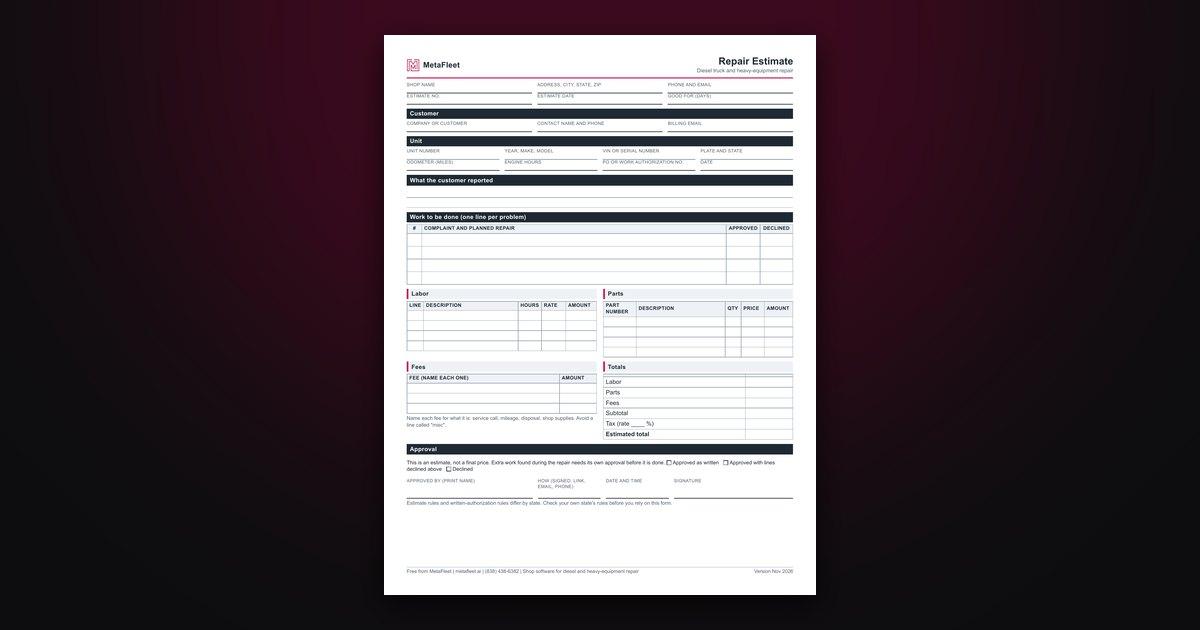
A free repair estimate template for diesel truck and heavy-equipment shops, with a plain guide to what an estimate needs so customers can approve it fast.
A repair estimate should show who the work is for, the unit with its VIN or serial number, what was reported, each planned repair on its own line, labor, parts, fees, tax and the total. Add how long the price holds and a place for approval. Extra work found later needs a new approval.
A repair estimate is the price for work the customer has not approved yet. It needs to be clear enough that a fleet manager can say yes or no to each repair without calling you. The free template below has a place for every part of one, as a PDF to print and an Excel file to fill in.
This page is for service writers, owners and mobile techs at diesel truck and heavy-equipment shops. It covers what goes on an estimate and how to word it. The bill for finished work is a different paper: that one is covered in what to put on a truck repair invoice.
Repair Estimate Template
A one-page estimate for truck and equipment repair, with the unit, a line for each repair, labor, parts, fees, tax and an approval block. Comes as a PDF to print and an Excel file that adds up the totals.
No spam. Just the occasional guide for repair shops and fleets.
What an estimate needs
| Part of the estimate | What goes in it |
|---|---|
| Shop and estimate details | Shop name, phone, estimate number, date and how many days the price holds |
| Customer | The company that pays, who to contact and the billing email |
| Unit | Unit number, year, make, model, VIN or serial number, plate, and mileage or engine hours |
| Reported problem | What the driver or customer said, in their words |
| Planned repairs | One line for each problem, so each can be approved or declined |
| Labor | Hours and rate for each line |
| Parts | Part number, description, quantity and price |
| Fees | Each fee named for what it is, such as service call or disposal |
| Tax and total | Subtotal, tax and the estimated total |
| Approval | Who approved, how and when |
Write each repair as its own line
One line for each problem lets the customer approve the brake job and turn down the hose. Name the part and where it is on the unit, such as "Replace the left rear brake chamber and check the slack adjuster." A line like "fix brakes" gets a phone call. After the work is done, the same problem is written up as complaint, cause and correction: see how to write a repair line.
Get the approval before the work starts
Write down who said yes, how and when. A signature, an approval link, an email or the fleet's PO number all work as a record. A yes on the phone that nobody wrote down is the one that turns into a dispute. Extra work found partway through the repair needs its own approval before anyone does it. See customer authorization and estimate in the shop glossary.
Some states have rules about written estimates and approval before work starts. Check your own state's rules and your fleet customers' terms before you rely on this form.
Estimate mistakes that slow approval
- One lump-sum total, so the customer cannot approve part of it.
- No unit number or VIN, so the estimate cannot be matched to a truck.
- No date the price holds until, so parts prices change under a signed estimate.
- Vague repair lines that a fleet manager cannot judge.
- Fees lumped into "misc."
- No record of who approved it.
Where MetaFleet fits
In MetaFleet the customer approves each repair on the estimate from a link, so the go-ahead is in writing before the truck is touched. See it in MetaFleet in action: approved from a link, or read how invoicing and payments work in invoicing and payments for diesel repair shops.
FAQs
Ready for estimates customers approve from a link?
See MetaFleet in Action
Book a demo and we'll walk through how your shop writes and approves estimates today, show you where MetaFleet fits, and build a simple rollout plan your team can follow.
Not ready to talk? Try a free shop tool
Related Articles

Truck Repair Invoice: What to Include, Plus a Free Template
Every field a diesel truck or heavy-equipment repair invoice should carry, from the unit number and engine hours to complaint, cause and correction lines, plus road-call extras, the mistakes that hold up payment and a free template.

Complaint, Cause, Correction: How to Write a Repair Line
How to write the 3 Cs on a repair order, with weak and better examples from semis and yellow iron, why fleets and warranty reviewers push back on vague lines, how techs capture it on a phone and a checklist for every line.