
Work Order Template for Diesel and Heavy-Equipment Repair, Free PDF and Excel
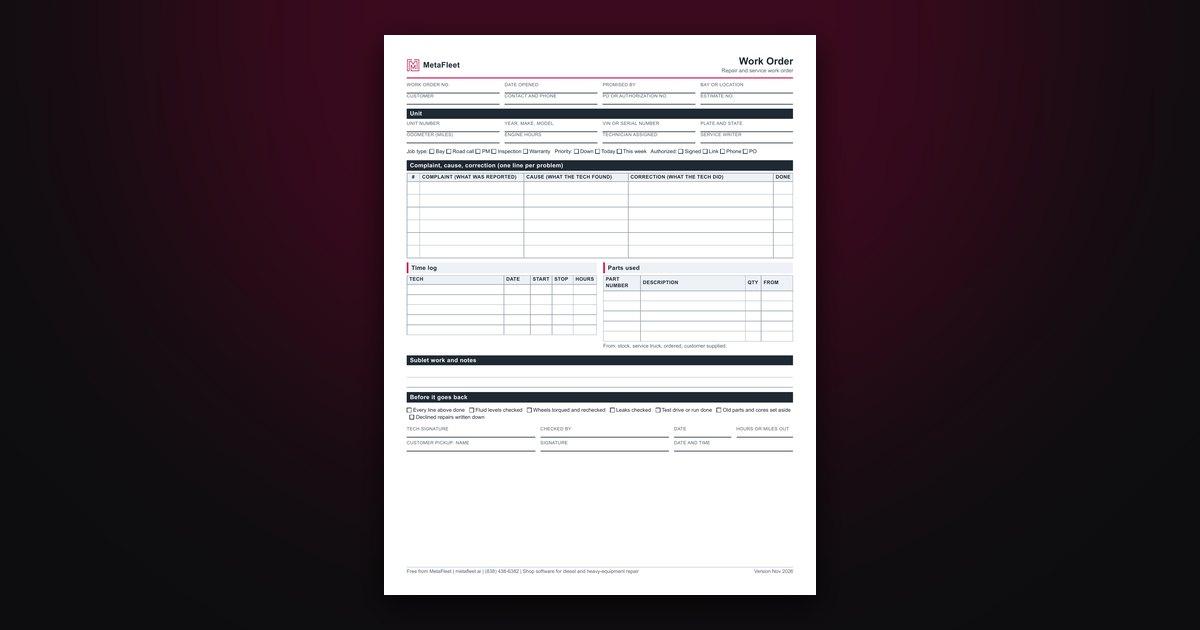
A free work order template for truck and heavy-equipment repair: the unit, complaint, cause and correction lines, a time log, parts used and a pickup signature.
A work order is the one sheet that follows a repair job from check-in to pickup. It names the customer and the unit, lists each problem as complaint, cause and correction, logs tech time and parts used, and ends with checks and a pickup signature. The free template below has all of it.
A work order is the one sheet that follows a repair job from the first call to the truck going back out. It tells the tech what to do, records what was done and gives the office what it needs to bill. The free template below comes as a PDF to print and an Excel file to fill in.
This is for service writers, shop foremen and mobile techs. It covers what the sheet needs and how to fill it so the invoice is easy to write. The price comes first on a repair estimate, and the bill comes last on a repair invoice.
Work Order Template
A one-page work order with the unit, complaint, cause and correction lines, a time log, parts used and a pickup signature. Comes as a PDF to print and an Excel file that adds up the hours.
No spam. Just the occasional guide for repair shops and fleets.
What is on the work order
| Part of the work order | Why it is there |
|---|---|
| Work order number and dates | One number for the job, the day it opened and the day it was promised |
| Customer and authorization | Who is paying and how the work was approved, with the PO number if there is one |
| Unit | Unit number, VIN or serial number, plate, mileage and engine hours in |
| Job type and priority | Bay or road call, PM, inspection or warranty, and how urgent it is |
| Complaint, cause, correction | One row for each problem, in three parts |
| Time log | Which tech worked, when, and the hours |
| Parts used | Part number, quantity and where it came from: stock, service truck or ordered |
| Before it goes back | The checks that happen before the keys do |
| Signatures | The tech, the person who checked the work and the customer at pickup |
Fill it in while the job is open
Write the complaint when the truck checks in, in the customer's words. The tech fills in the cause and the correction as the work happens, not at the end of the day. Hours go in the time log when a tech starts and stops, so the labor on the invoice matches the work. List every part as it leaves the shelf or the service truck. Anything missed here is money the shop does not bill.
Parts the customer supplied go on the sheet too, marked that way, because they change your warranty. Declined repairs are written down so the record shows the customer was told.
Close it out the same way each time
The checks at the bottom are short on purpose: every line done, fluids, wheels torqued and rechecked, leaks, a test drive or run, old parts and cores set aside. A second person looks the sheet over before the unit leaves. Then the customer signs at pickup. See repair order in the shop glossary.
Work order mistakes
- A different number on the sheet, the estimate and the invoice.
- Hours written from memory at the end of the week.
- Parts pulled from the service truck and never written down.
- Correction lines such as "repaired as needed."
- A road call with no arrival and finish times.
Where MetaFleet fits
In MetaFleet the techs work the whole job from any phone browser and get new jobs by text. The AI turns a tech's shorthand notes into clean repair lines, and the tech enters the hours. See MetaFleet in action: the tech app, or read about dispatch for diesel repair shops.
FAQs
Ready to run jobs without paper chasing?
See MetaFleet in Action
Book a demo and we'll walk through how a job moves through your shop today, show you where MetaFleet fits, and build a simple rollout plan your team can follow.
Not ready to talk? Try a free shop tool
Related Articles

Complaint, Cause, Correction: How to Write a Repair Line
How to write the 3 Cs on a repair order, with weak and better examples from semis and yellow iron, why fleets and warranty reviewers push back on vague lines, how techs capture it on a phone and a checklist for every line.

Truck Repair Invoice: What to Include, Plus a Free Template
Every field a diesel truck or heavy-equipment repair invoice should carry, from the unit number and engine hours to complaint, cause and correction lines, plus road-call extras, the mistakes that hold up payment and a free template.